Improving Software Quality
Introduction
You have now run your own, simple, application developed for Zephyr RTOS. Before you develop a more complex application, we need to ensure that it meets certain quality standards. The aim of this codelab is to add this dimension to your project, providing a solid foundation for future work.
What you’ll build
This codelab will teach you the tools and guidelines required for building high-quality software. These should, of course, be used when creating any type of software. You will also learn how to interpret the results delivered by the tools in order to improve your work.
What you’ll learn
- How to set up the tools for ensuring certain quality standards.
- Start ensuring quality throughout the entire development lifecycle.
- Understand the different elements composing quality and how to interpret the results provided by the different analysis tools.
What you’ll need
- You need to have completed the Getting started with Zephyr RTOS.
- You need to install a number of additional software components as documented in the codelab.
- You need
python3to be installed on your machine, which is the case since we are usingwestto develop our Zephyr RTOS applications.
Enforcing a common coding style: clang-format
In most cases, software is developed by many contributors. Imposing a common coding style can improve the readability and maintainability of the code of and by all contributors. Code consistency is also important for code reviews, where different contributors revise code written by others.
In this course, we will use clang-format, which is a relatively easy-to-use
tool for enforcing a common code style for your projects written in C++.
clang-format Installation
In a terminal of your virtual Python environment, run python -m pip install
clang-format. This will install the
clang-format Python
package in your virtual environment.
Once you have installed clang-format, run the command clang-format
--version. It should print the version of the software installed. At the time
of writing, the latest version was v22.1.5.
Run a first clang-format operation
To use clang-format, you first need to create a configuration file named
.clang-format at the root of your project - where you will run the
clang-format tool. This file contains various configuration parameters and
the ones that you must use are:
.clang-format
---
BasedOnStyle: LLVM
IndentWidth: 2
Language: Cpp
ColumnLimit: 140
AlignConsecutiveAssignments: true
DerivePointerAlignment: false
PointerAlignment: Left
BinPackArguments: false
BinPackParameters: false
IndentAccessModifiers: false
AllowShortFunctionsOnASingleLine: Empty
BreakBeforeBraces: Attach
ReferenceAlignment: Left
SpacesBeforeTrailingComments: 2
The parameters for configuring clang-format are described
here.
You should be able to understand the options used in the configuration file illustrated above from this documentation.
To use clang-format, run the command clang-format -i blinky/src/main.cpp. The -i option indicates that the file
will be edited in place. This means that if clang-format detects any necessary changes to the file, it will modify the
file accordingly. Without the -i option, clang-format simply outputs the modified file to the console without
modifying the file itself.
Copyrighting your work
No matter what software one writes, a copyright shall always be specified -
no matter whether open source or proprietary in its nature. For our project,
we use a simple script provided here that checks that the copyright section
has been added at file start. The script is provided with zpp_lib:
check_copyright.py
import sys

status = 0

for f in sys.argv[1:]:
    with open(f, "r", encoding="utf-8", errors="ignore") as file:
        content = file.read()

    if "Copyright" not in content:
        print(f"ERROR: Missing copyright header: {f}")
        status = 1

    if "@author" not in content:
        print(f"ERROR: Missing or invalid author in header: {f}")
        status = 1

sys.exit(status)
In case you forget to apply this rule, the following error will be shown ” No
copyright message found. You must have a line: Copyright [year] <Copyright
Owner>” and in any file containing code
An example of such copyright can be found below:
  /**
  ******************************************************************************
  * @file        : monnalisa.hpp
  * @brief       : pensive woman module
  * @author      : Leonardo Da Vinci <leo@davinci.net>
  * @date        : 19. March 1503
  ******************************************************************************
  * @copyright   : Copyright (c) 1503
  *                Haute école de peinture de Florence
  * @attention   : SPDX-License-Identifier: MIT OR Apache-2.0
  ******************************************************************************
  * @details
  * Pensive woman module for impressing humankind
  ******************************************************************************
  */
Static C++ Code Analysis: clang-tidy
cpplint does not perform semantic analysis, so it cannot detect issues such as the following:
- Type safety violations
- Ownership and lifetime issues
- Unused variables and dead code
- Modernisation suggestions (e.g. nullptr, range-for, override)
- Performance issues (e.g. unnecessary copies, pass-by-value)
- Enforcement of the actual C++ Core Guidelines
- Bug-prone patterns (e.g. integer overflow, signed/unsigned comparison)
cpplint cannot detect any of these issues because it does not parse the code. Conversely, clang-tidy performs
semantic analysis, understands the code structure and can detect many of the above issues. In particular, it can enforce
many of the C++ Core Guidelines.
It analyzes source code without executing it and helps detect:
- Potential bugs (bugprone-*)
- Performance issues (performance-*)
- Modernization opportunities (modernize-*)
- Readability problems (readability-*)
-
Violations of coding guidelines (cppcoreguidelines-*)
-
Clang Static Analyzer checks (clang-analyzer-*: )
To analyze code accurately, clang-tidy typically uses a compilation database (compile_commands.json) generated by
the build system (e.g., CMake or Zephyr). Some justfile recipes are included in the provided justfile for this purpose.
More documentation about clang-tidy can be found here.
The list of available checks is described here.
clang-tidy Installation
Installation on Ubuntu / Debian
Install clang-tidy from the distribution packages by using:
sudo apt update
sudo apt install clang-tidy
To install a specific LLVM version:
sudo apt install clang-tidy-20
Installation on macOS
Using Homebrew:
brew install llvm
Then add LLVM to your PATH:
export PATH="$(brew --prefix llvm)/bin:$PATH"
Installation on Windows
Install LLVM from the official LLVM project:
or via Chocolatey:
choco install llvm
Verify the installation
clang-tidy --version
The version to use for this lecture is v22.1.7.
Using clang-tidy for your project
The configuration of clang-tidy is defined in a .clang-tidy file. The file to use for the codelabs and the project
is the following:
.clang-tidy
# .clang-tidy
---
Checks: >
  -*,
  bugprone-*,
  clang-analyzer-*,
  cppcoreguidelines-*,
  modernize-*,
  performance-*,
  portability-*,
  readability-*,
  -cppcoreguidelines-pro-type-vararg,
  -cppcoreguidelines-pro-bounds-pointer-arithmetic,
  -modernize-use-trailing-return-type,
  -readability-identifier-length,
  -portability-avoid-pragma-once

# Treat all warnings as errors in CI
WarningsAsErrors: "cppcoreguidelines-*"

# Only analyse your application headers, not Zephyr headers
HeaderFilterRegex: '(^|.*/)(blinky|bike_computer|bme280|sanitize|simple_tests|multi_tasking)/app/src/.*'

# Explicitly exclude Zephyr and dependency headers (clang-tidy 22+)
ExcludeHeaderFilterRegex: ".*/deps/zephyr/.*"

FormatStyle: file

CheckOptions:
  - key: readability-identifier-naming.ClassCase
    value: CamelCase
  - key: readability-identifier-naming.FunctionCase
    value: lower_case
  - key: readability-identifier-naming.VariableCase
    value: lower_case
  - key: readability-identifier-naming.ConstantCase
    value: lower_case
  - key: readability-identifier-naming.ConstantCasePrefix
    value: "c"
  - key: readability-identifier-naming.ConstexprVariableCase
    value: CamelCase
  - key: readability-identifier-naming.ConstexprVariablePrefix
    value: "k"
  - key: readability-identifier-naming.EnumConstantCase
    value: CamelCase
  - key: readability-identifier-naming.EnumConstantPrefix
    value: ""
  - key: readability-identifier-naming.EnumCase
    value: CamelCase
  - key: readability-identifier-naming.EnumPrefix
    value: ""
  - key: readability-identifier-naming.StaticConstantCase
    value: CamelCase
  - key: readability-identifier-naming.StaticVariableCase
    value: lower_case
  - key: readability-identifier-naming.StaticVariablePrefix
    value: "s_"
  - key: readability-identifier-naming.PrivateMemberCase
    value: lower_case
  - key: readability-identifier-naming.PrivateMemberPrefix
    value: "_"
  - key: readability-function-cognitive-complexity.Threshold
    value: 80
  - key: readability-function-cognitive-complexity.IgnoreMacros
    value: true
  - key: readability-function-cognitive-complexity.DescribeBasicIncrements
    value: false
You may add more checks or configure some options, but you must not remove checks. Your project will be checked against this file and modifying the configuration may lead to undetected warnings or errors.
The use of clang-tidy for compiling and checking a Zephyr RTOS application is documented
in the justfile. Every analysis is made of several steps:
- First the application is compiled for the
native_simboard and the related compilation database (build/compile_commands.json) is generated. - The database is modified to fit the
clang-tidycompiler options. - The
main.cppfile of a specific application can be checked by using theclang-tidyrecipe (e.g. by invokingjust clang-tidy blinky). This is a good starting point. - The
run-clang-tidyrecipe can be used to check an entire application, for example by invokingjust run-clang-tidy blinky.
Fixing issues found by any of the tools
It is important that any fix/bug correction made to your code are done using the
proper git branch process. For this purpose, you need to:
- Create a dedicated branch on your repository: you should create a different dedicated branch for a specific code release and you should name it accordingly.
- Fix the identified issues in this branch: no other changes should be implemented in this particular branch and in particular, implementing fixes and features should not be mixed.
- Commit your changes: add a clear commit message for each specific change implemented in this branch. Remember that small commits are usually better than larger ones. So, you should commit one change at a time and not all changes at once.
Putting all together: pre-commit
You are now capable of checking your code and of implementing fixes to it by
following the proper git guidelines. We still need to make sure that any
change in the code goes through the entire continuous checking pipeline. How
can one ensure this?
One way would be to check it centrally using a CI/CD pipeline on a git
repository, but that would be late (and consume energy for nothing).
One probably better approach is to use pre-commit, that does exactly what its name
implies. pre-commit allows to run a serie of checks prior to committing.
pre-commit Installation
In order to install it, head to
https://pre-commit.com/ and follow the instructions. Verify
your installation with pre-commit --version. At the time of writing, the version was v3.6.2.
Using pre-commit
So, once installed, we add all the tools seen so far in the pre-commit phase by
following these instructions:
- create a
.pre-commit-config.yamlfile at the root of yourgitproject with the following content:
.pre-commit-config.yaml
exclude: ^(welcome/|path_finder/|semaphores/|car_system/)
repos:
- repo: https://github.com/pre-commit/pre-commit-hooks
  rev: v6.0.0
  hooks:
  -   id: check-yaml
      files: \.(yaml|yml)$
      args: [--allow-multiple-documents]
  -   id: end-of-file-fixer
      files: \.(c|cc|cpp|cxx|h|hpp|hxx)$
  -   id: trailing-whitespace
      files: \.(c|cc|cpp|cxx|h|hpp|hxx)$
- repo: https://github.com/pre-commit/mirrors-clang-format
  rev: 'v22.1.5'
  hooks:
  - id: clang-format
    files: \.(c|cc|cpp|cxx|h|hpp|hxx)$
- repo: local
  hooks:
  - id: copyright
    name: Check copyright
    entry: python deps/zpp_lib/scripts/check_copyright.py
    language: system
    pass_filenames: true
    files: \.(c|cc|cpp|cxx|h|hpp|hxx)$
- repo: local
  hooks:
  - id: clang-tidy-blinky
    name: clang-tidy-blinky
    entry: python deps/zpp_lib/scripts/run_clang_tidy.py --app blinky --board nrf5340dk/nrf5340/cpuapp --shield adafruit_2_8_tft_touch_v2 --configs "log+debug+gpio" --wd "."
    language: system
    pass_filenames: true
    require_serial: true
    files: ^(blinky)/.*\.(c|cc|cpp|cxx)$
  - id: clang-tidy-bme280
    name: clang-tidy-bme280
    entry: python deps/zpp_lib/scripts/run_clang_tidy.py --app bme280 --board nrf5340dk/nrf5340/cpuapp --shield adafruit_2_8_tft_touch_v2 --configs "log+debug+sensor" --wd "."
    language: system
    pass_filenames: true
    require_serial: true
    files: ^(bme280)/.*\.(c|cc|cpp|cxx)$
  - id: clang-tidy-sanitize
    name: clang-tidy-sanitize
    entry: python deps/zpp_lib/scripts/run_clang_tidy.py --app sanitize --board nrf5340dk/nrf5340/cpuapp --shield adafruit_2_8_tft_touch_v2 --configs "log+debug+san" --wd "."
    language: system
    pass_filenames: true
    require_serial: true
    files: ^(sanitize)/.*\.(c|cc|cpp|cxx)$
  - id: clang-tidy-always-succeed
    name: clang-tidy-always-succeed
    entry: python deps/zpp_lib/scripts/run_clang_tidy.py --app simple_tests/always_succeed --board nrf5340dk/nrf5340/cpuapp --shield adafruit_2_8_tft_touch_v2 --configs "log+debug+test" --wd "."
    language: system
    pass_filenames: true
    require_serial: true
    files: ^(simple_tests/always_succeed)/.*\.(c|cc|cpp|cxx)$
  - id: clang-tidy-ptr-test
    name: clang-tidy-ptr-test
    entry: python deps/zpp_lib/scripts/run_clang_tidy.py --app simple_tests/ptr_test --board nrf5340dk/nrf5340/cpuapp --shield adafruit_2_8_tft_touch_v2 --configs "log+debug+test" --wd "."
    language: system
    pass_filenames: true
    require_serial: true
    files: ^(simple_tests/ptr_test)/.*\.(c|cc|cpp|cxx)$
  - id: clang-tidy-bike-computer
    name: clang-tidy-bike-computer
    entry: python deps/zpp_lib/scripts/run_clang_tidy.py --app bike_computer --board nrf5340dk/nrf5340/cpuapp --shield adafruit_2_8_tft_touch_v2 --configs "debug+gpio+display+sensor+phase_a" --wd "."
    language: system
    pass_filenames: true
    require_serial: true
    files: ^(bike_computer)/(?!tests/).*\.(c|cc|cpp|cxx)$
  - id: clang-tidy-bike-computer-speedometer
    name: clang-tidy-bike-computer-speedometer
    entry: python deps/zpp_lib/scripts/run_clang_tidy.py --app bike_computer/tests/speedometer --board nrf5340dk/nrf5340/cpuapp --shield adafruit_2_8_tft_touch_v2 --configs "log+debug+gpio+display+sensor+test+phase_a+phase_b+phase_c" --wd "."
    language: system
    pass_filenames: true
    require_serial: true
    files: ^(bike_computer/tests/speedometer)/.*\.(c|cc|cpp|cxx)$
  - id: clang-tidy-bike-computer-sensor-device
    name: clang-tidy-bike-computer-sensor-device
    entry: python deps/zpp_lib/scripts/run_clang_tidy.py --app bike_computer/tests/sensor_device --board nrf5340dk/nrf5340/cpuapp --shield adafruit_2_8_tft_touch_v2 --configs "log+debug+gpio+display+sensor+test+phase_a" --wd "."
    language: system
    pass_filenames: true
    require_serial: true
    files: ^(bike_computer/tests/sensor_device)/.*\.(c|cc|cpp|cxx)$
  - id: clang-tidy-bike-computer-bike-system-part1
    name: clang-tidy-bike-computer-bike-system-part1
    entry: python deps/zpp_lib/scripts/run_clang_tidy.py --app bike_computer/tests/bike_system_part1 --board nrf5340dk/nrf5340/cpuapp --shield adafruit_2_8_tft_touch_v2 --configs "log+debug+gpio+display+sensor+test+phase_a" --wd "."
    language: system
    pass_filenames: true
    require_serial: true
    files: ^(bike_computer/tests/bike_system_part1)/.*\.(c|cc|cpp|cxx)$
  - id: clang-tidy-bike-computer-bike-system-part2
    name: clang-tidy-bike-computer-bike-system-part2
    entry: python deps/zpp_lib/scripts/run_clang_tidy.py --app bike_computer/tests/bike_system_part2 --board nrf5340dk/nrf5340/cpuapp --shield adafruit_2_8_tft_touch_v2 --configs "log+debug+gpio+display+sensor+test+phase_b" --wd "."
    language: system
    pass_filenames: true
    require_serial: true
    files: ^(bike_computer/tests/bike_system_part2)/.*\.(c|cc|cpp|cxx)$
  - id: clang-tidy-bike-computer-bike-system-part3
    name: clang-tidy-bike-computer-bike-system-part3
    entry: python deps/zpp_lib/scripts/run_clang_tidy.py --app bike_computer/tests/bike_system_part3 --board nrf5340dk/nrf5340/cpuapp --shield adafruit_2_8_tft_touch_v2 --configs "log+debug+gpio+display+sensor+button_emul+test+phase_c" --wd "."
    language: system
    pass_filenames: true
    require_serial: true
    files: ^(bike_computer/tests/bike_system_part3)/.*\.(c|cc|cpp|cxx)$
  - id: clang-tidy-multi-tasking
    name: clang-tidy-multi-tasking
    entry: python deps/zpp_lib/scripts/run_clang_tidy.py --app multi_tasking --board nrf5340dk/nrf5340/cpuapp --shield adafruit_2_8_tft_touch_v2 --configs "log+debug+stats+gpio" --wd "." --app-config prj_multi_tasking.conf
    language: system
    pass_filenames: true
    require_serial: true
    files: ^(multi_tasking)/.*\.(c|cc|cpp|cxx)$
- add
.pre-commit-config.yamlto yourgitrepository - install the hooks with
pre-commit install - run the command manually by issuing
pre-commit run --all-files - if you did a good job in fixing the issues manually, all will be green.
For a better understanding of pre-commit configuration, answer to the
questions in Configuring pre-commit.
Note that the clang-tidy pre-commit hook uses a script provided with zpp_lib:
run_clang_tidy.py
#!/usr/bin/env python3

from pathlib import Path
import os
import subprocess
import sys
import argparse
import shutil
import re

SCRIPT_DIR = Path(__file__).resolve().parent

def run(cmd):
    print("+", " ".join(cmd))

    if os.name == "nt" and cmd[0].endswith("run-clang-tidy"):
        cmd.insert(0, sys.executable)

    subprocess.run(cmd, check=True)

def find_llvm_tool(name):
    executable = shutil.which(name)

    if executable is None:
        raise RuntimeError(f"{name} not found in PATH")

    return Path(executable)

def build_database(
    app: str,
    configs: str,
    board: str,
    shield: str = None,
    app_config: str = None,
):
    build_script = SCRIPT_DIR / "build.py"
    cmd = [
        sys.executable,
        str(build_script),
        "--app",
        app,
        "--configs",
        configs,
        "--board",
        board,
        "--pristine"
    ]
    if shield:
        cmd.extend(["--shield", shield])
    if app_config:
        cmd.extend(["--app-config", app_config])
    run(cmd)


def filter_database(header_root: str):
    Path("build_clang").mkdir(exist_ok=True)
    filter_script = SCRIPT_DIR / "filter_compile_commands.py"
    run([
        sys.executable,
        str(filter_script),
        "build/compile_commands.json",
        "build_clang/compile_commands.json",
        str(header_root),
    ])

def run_clang_tidy(source_filter: str):
    clang_tidy = shutil.which("clang-tidy")

    if clang_tidy is None:
        raise RuntimeError("clang-tidy not found in PATH")

    executable = Path(clang_tidy).parent / "run-clang-tidy"

    cmd = [
        "-p",
        "build_clang",
        "-source-filter",
        source_filter,
        "-warnings-as-errors=*",
        "-quiet",
    ]

    if sys.platform == "win32":
        run([sys.executable, str(executable), *cmd])
    else:
        run([str(executable), *cmd])


def sep_re(path):
    return r"[/\\]+".join(re.escape(p) for p in re.split(r"[/\\]", path))


def run_clang_tidy_patterns(
    workdir: str,
    app: str,
    include_zpp_lib: bool = False,
):
    patterns = [
        rf".*[/\\]+{sep_re(app)}[/\\]+src[/\\]+.*\.cpp$",
        r".*[/\\]+build_clang[/\\]+header_tus[/\\]+.*\.cpp$",
    ]

    if include_zpp_lib:
        patterns.append(r".*[/\\]zpp_lib[/\\].*\.cpp$")

    source_filter = "|".join(f"(?:{p})" for p in patterns)

    run_clang_tidy(source_filter)

def run_clang_tidy_files(files):
    for f in files:
        if not f.endswith((".cpp", ".cc", ".cxx")):
            continue

        run([
            "clang-tidy",
            "-p",
            "build_clang",
            f,
            "--warnings-as-errors=*",
            "-quiet",
        ])


def main():

    parser = argparse.ArgumentParser()
    parser.add_argument("--app", required=True)
    parser.add_argument("--board", default="native_sim")
    parser.add_argument("--configs", required=True)
    parser.add_argument("--wd", required=True)
    parser.add_argument("--header-root", required=True)
    parser.add_argument("--shield", required=False)
    parser.add_argument("--app-config", required=False)
    parser.add_argument("files", nargs="*")

    args = parser.parse_args()

    args.app = args.app.rstrip("/\\")

    print(f"App: {args.app}")
    print(f"Configs: {args.configs}")
    if args.app_config:
        print(f"App Config: {args.app_config}")
    print(f"Working directory: {args.wd}")
    print(f"Board: {args.board}")
    print(f"Header root: {args.header_root}")
    if (args.shield):
        print(f"Shield: {args.shield}")

    build_database(args.app, args.configs, args.board, args.shield, args.app_config)
    filter_database(args.header_root)
    if args.files:
        print("Running clang-tidy on files:")
        for f in args.files:
            print(f"  {f}")
        run_clang_tidy_files(args.files)
    else:
        print("Running clang-tidy on app:" + args.app)
        # When the app is one of the zpp_lib tests programs, we include zpp_lib in the analysis
        include_zpp_lib = "zpp_" in args.app
        print(f"Include zpp_lib: {include_zpp_lib}")
        run_clang_tidy_patterns(args.wd, args.app, include_zpp_lib=include_zpp_lib)

if __name__ == "__main__":
    main()
It is important to understand that each clang-tidy-XXX hook is specific to one application. The file above contains hooks
for applications that you have not yet developed. You will need to remove them and then add them back when you develop
these applications. You will also need to add a dedicated hook for any additional application, such as the bike_computer
application developed within the scope of the project.
That’s it!. From now on, all code changes will undergo the specified checks.
blinky and C++ Core Guidelines
To run pre-commit on your blinky application, all issues including C++ Core Guidelines warnings,
must be fixed. It is worth to mention the following rules that are easy to break when implementing the
blinky application:
- I2: Avoid non-
constglobal variables: if you declare any of the variables declared inside themainfunction as a global variable, you will get the following warning fromclang-tidy. - ES.45: Avoid “magic constants”; use symbolic constants:
if you use any magic number in your code such as
for (uint32_t i = 0; i < 500, i++). you will the following warning fromclang-tidy. - ES.20: Always initialize an object:
if you declare a variable without initializing it or if you define a
structand declare an instance of thisstructwithout initializing each member, you will get the following warning fromclang-tidy.
It is worth reading carefully the explanations given in the C++ Core Guidelines documentation for each warning.
The list of checks performed by clang-tidy is long and the examples provided above are just a few of the many
common warnings.
Beyond Static Analysis: Detecting Errors at Runtime
Static analysis tools, such as clang-tidy, are good at detecting errors that are independent of runtime behavior.
For instance, suppose you are reading values from a sensor and get unexpected values at runtime. Static analysis will not
always detect such errors, and if the code is not resilient to these values, unexpected runtime behavior may occur.
Unlike other programming languages, C++ and C leave a number of behaviors unspecified. An important category of unspecified behaviors is the undefined behavior category, for which no restrictions on the program behavior is defined. Examples of undefined behavior include access outside of array bounds, signed integer overflow and null pointer dereference. In other words, when such a behavior occurs at runtime, it is impossible to predict the program’s behavior. Therefore, it is extremely important to prevent such errors. We will illustrate the problem of accessing an array outside its bounds and its detection with a sanitizer.
What is a Sanitizer
Static code analyzers and sanitizers are tools that work together to improve software quality. Static analyzers,
like clang-tidy, look at source code without running it to find problems like breaking coding rules, strange structures,
or possible bugs. Sanitizers, on the other hand, instrument the program and monitor its execution at runtime. They can
find errors that are hard to spot with static analysis alone, like buffer overflows, use-after-free errors, data races,
and memory leaks. Static analysis helps identify problems early in the development process, but sanitizers provide more
confidence by finding defects that only appear when the program is running.
Modern C++ compilers provide several sanitizers, each targeting a specific class of runtime defects. The sanitizers available in Zephyr RTOS are:
-
Undefined behavior sanitizer (
UBSan) detects operations that result in undefined behavior according to the C++ standard. Examples include signed integer overflows, invalid type conversions, null pointer dereferences, misaligned memory accesses, and out-of-bounds array indexing. Undefined behavior can cause unpredictable program execution and may lead to bugs that are difficult to debug. -
Address Sanitizer (
ASan) detects memory safety issues such as buffer overflows, stack overflows, use-after-free errors, use-after-scope errors, and invalid memory accesses. It is one of the most widely used sanitizers because memory corruption bugs are often difficult to reproduce and diagnose. -
Memory Sanitizer (
MSan) detects the use of uninitialized memory. Reading variables before they have been properly initialized can produce incorrect results and unpredictable behavior.
These sanitizers complement each other and can often be enabled during development and testing with compiler options
such as -fsanitize=address or -fsanitize=undefined. Since sanitizer instrumentation adds to the runtime overhead,
they are usually only enabled in debug or testing builds.
On Zephyr RTOS, the availability and effectivness of these sanitizers also depend on the target platform.
ASan and MSan are only available for POSIX (native) architectures. UBSan is available on all platforms. On Zephyr RTOS,
sanitizers can be enabled using configuration parameters such as CONFIG_UBSAN. Configuration can also be changed by
adding compiler/linker options directly in the CMakeLists.txt file as explained below.
Detecting Array Access outside Bounds
Static code analyzers can detect errors when all parameters are known at compile time. For example, if you add the following two lines to a function:
char a[10] = {};
a[10] = 0;
then clang-tidy will detect the following error.
However, in many situations, the static analyzer cannot make assumptions about the behavior, so it cannot detect
unexpected runtime errors. One example is reading a value from a sensor and using it to access an array. To illustrate
this case, we develop a small sanitize application.
The sanitize Application
The sanitize application can be created as follows:
-
Create a new application with
just create-app sanitize. -
Modify the application name in the
sanitize/CMakeLists.txtfile. -
Add the following lines to the
sanitize/prj.conffile:sanitize/prj.conf... # we use the shell for console input CONFIG_SHELL=y CONFIG_SHELL_BACKEND_SERIAL=y CONFIG_UART_CONSOLE=y CONFIG_SERIAL=y -
Replace the
main.cppfile with:
main.cpp
// Copyright 2025 Haute école d'ingénierie et d'architecture de Fribourg
//
// Licensed under the Apache License, Version 2.0 (the "License");
// you may not use this file except in compliance with the License.
// You may obtain a copy of the License at
//
//     http://www.apache.org/licenses/LICENSE-2.0
//
// Unless required by applicable law or agreed to in writing, software
// distributed under the License is distributed on an "AS IS" BASIS,
// WITHOUT WARRANTIES OR CONDITIONS OF ANY KIND, either express or implied.
// See the License for the specific language governing permissions and
// limitations under the License.

/****************************************************************************
 * @file main.cpp
 * @author Serge Ayer <serge.ayer@hefr.ch>
 *
 * @brief Main function of the Blinky program
 *
 * @date 2025-07-01
 * @version 1.0.0
 ***************************************************************************/

// zephyr
#include <cerrno>
#include <zephyr/shell/shell.h>
#include <zephyr/shell/shell_string_conv.h>

// stl
#include <atomic>
#include <chrono>

// zpp_lib
#include "zpp_include/this_thread.hpp"
#include "zpp_include/zpp_assert.hpp"
#include "zpp_include/zpp_log.hpp"

ZPP_LOG_MODULE_REGISTER(sanitize, CONFIG_APP_LOG_LEVEL);

// for this example, we use c array on purpose
// NOLINTBEGIN(cppcoreguidelines-avoid-c-arrays,modernize-avoid-c-arrays,cppcoreguidelines-pro-bounds-constant-array-index)
// constants for the lookup table
static constexpr int32_t kLutSize                        = 8;
static constexpr uint8_t kOffset                         = 1;
static constexpr int32_t kLut[kLutSize]                  = {10, 20, 30, 40, 50, 60, 70, 80};
static constexpr std::array<int32_t, kLutSize> kLutArray = {10, 20, 30, 40, 50, 60, 70, 80};

// pure c, with assertion for bounds checking
// when assertions are disabled, no bound checking is done
int32_t lookup_c_assert(int32_t sensor_value) {
  int32_t idx = sensor_value - kOffset;  // intended normalization
  // will abort if idx is out of bounds, but only when assertions are enabled
  ZPP_ASSERT(idx >= 0 && idx < kLutSize, "Index out of bounds: %d", idx);
  return kLut[idx];
}

// pure c, with clamping to valid range
static int32_t lookup_c_safe(int32_t sensor_value) {
  int32_t idx = sensor_value - kOffset;  // intended normalization
  if (idx < 0) {
    idx = 0;
  } else if (idx >= kLutSize) {
    idx = kLutSize - 1;
  }

  return kLut[idx];
}

// pure c++, using std::array for bounds checking
static int32_t lookup_cpp(int32_t sensor_value) {
  int32_t idx = sensor_value - kOffset;  // intended normalization
  return kLutArray.at(idx);              // will throw std::out_of_range if idx is out of bounds
}

// C++, use class with static method for lookup and fault counting
class LookUpTable {
public:
  static int32_t lookup(int32_t sensor_value) {
    int32_t idx = sensor_value - kOffset;  // intended normalization
    if (idx < 0 || idx >= kLutSize) {
      record_fault();
      return kFailSafeValue;
    }

    return kLut[idx];
  }

  static uint32_t fault_count() {
    return s_count;
  }

private:
  static constexpr int32_t kFailSafeValue = -1;  // or some other value indicating an error
  static void record_fault() {
    ++s_count;
  }
  static inline uint32_t s_count = 0;
};

static long parse_args(const struct shell* sh, size_t argc, char** argv) {
  if (argc != 2) {
    shell_error(sh, "Usage: sensor <lookup_function>");
    return -EINVAL;
  }

  static constexpr int kBase = 10;
  int parse_error            = 0;
  long parsed_lookup_value   = shell_strtol(argv[1], kBase, &parse_error);
  if (parse_error != 0) {
    shell_error(sh, "Invalid lookup function: %s", argv[1]);
    return -EINVAL;
  }

  return parsed_lookup_value;
}

// This is an internal function
// NOLINTNEXTLINE(bugprone-easily-swappable-parameters)
static int32_t lookup_value(const struct shell* sh, int32_t sensor_value, long lookup_function) {
  switch (lookup_function) {
  case 0: {
    shell_print(sh, "Using lookup_c_assert");
    return lookup_c_assert(sensor_value);
  } break;
  case 1: {
    shell_print(sh, "Using lookup_c_safe");
    return lookup_c_safe(sensor_value);
  } break;
  case 2: {
    shell_print(sh, "Using lookup_cpp");
    return lookup_cpp(sensor_value);
  } break;
  case 3: {
    shell_print(sh, "Using LookUpTable");
    return LookUpTable::lookup(sensor_value);
  } break;
  default: {
    shell_error(sh, "Invalid lookup function: %ld", lookup_function);
    return -EINVAL;
  } break;
  }
  return -EINVAL;
}
// NOLINTEND(cppcoreguidelines-avoid-c-arrays,modernize-avoid-c-arrays,cppcoreguidelines-pro-bounds-constant-array-index)

// This variable is used to simulate a sensor value that can be incremented or decremented via shell commands.
// In a real application, this value would come from an actual sensor reading and would not exist.
// NOLINTNEXTLINE(cppcoreguidelines-avoid-non-const-global-variables)
std::atomic<int32_t> sensor_value(0);  // example sensor value, in a real application this would come from a sensor

static int cmd_inc(const struct shell* sh, size_t argc, char** argv) {
  long parsed_lookup_value = parse_args(sh, argc, argv);
  sensor_value++;
  int32_t lookup_result = lookup_value(sh, sensor_value.load(), parsed_lookup_value);
  shell_print(sh, "looking up sensor value: %d -> %d", sensor_value.load(), lookup_result);
  return 0;
}

static int cmd_dec(const struct shell* sh, size_t argc, char** argv) {
  long parsed_lookup_value = parse_args(sh, argc, argv);
  sensor_value--;
  int32_t lookup_result = lookup_value(sh, sensor_value.load(), parsed_lookup_value);
  shell_print(sh, "looking up sensor value: %d -> %d", sensor_value.load(), lookup_result);
  return 0;
}

// These are Zephyr macros that we have no control over, so we disable the linter for these lines
// NOLINTNEXTLINE(performance-no-int-to-ptr, cppcoreguidelines-pro-type-cstyle-cast, bugprone-branch-clone)
SHELL_CMD_ARG_REGISTER(inc, NULL, "Increment value <lookup_function>", cmd_inc, 2, 0);
// NOLINTNEXTLINE(performance-no-int-to-ptr, cppcoreguidelines-pro-type-cstyle-cast, bugprone-branch-clone)
SHELL_CMD_ARG_REGISTER(dec, NULL, "Increment value <lookup_function>", cmd_dec, 2, 0);

int main() {
  ZPP_LOG_DBG("Running on board %s", CONFIG_BOARD_TARGET);

  // do not return
  while (true) {
    using std::literals::chrono_literals::operator""s;
    static constexpr auto kTimeout = 1s;  // example sensor value
    zpp_lib::ThisThread::sleep_for(kTimeout);
  }

  return 0;
}
-
Create the
prj_san.conffile with the following content:sanitize/prj_san.confCONFIG_UBSAN=y CONFIG_UBSAN_TRAP=y # we use the shell for console input CONFIG_SHELL=y CONFIG_SHELL_BACKEND_SERIAL=y CONFIG_UART_CONSOLE=y CONFIG_SERIAL=y -
Add the following lines to the
CMakeLists.txtfile:sanitize/CMakeLists.txt... zephyr_compile_options(-fsanitize=bounds -fsanitize=bounds-strict) zephyr_link_libraries(-fsanitize=bounds -fsanitize=bounds-strict)
The program implements a common lookup mechanism: given a value (e.g., captured from a sensor), retrieve another value from a lookup table. A common C/C++ implementation of a lookup table uses an array and an index to access an element of the lookup table. The issue is determining the expected behavior when the provided lookup value produces an index outside the bounds of the array.
The provided sanitize implements the lookup mechanism in four different ways:
lookup_c_assert: The index is checked and an assertion is triggered if it is outside the bounds.lookup_c_safe: The index is checked and clamped to a valid value.lookup_cpp: The lookup table is implemented using anstd::arrayinstance and the lookup value is obtained using theat()method.LookUpTable: The lookup mechanism is abstracted into aLookUpTableclass. The index is checked and invalid accesses are detected and counted.
The application opens a shell console. By typing inc [0-3] or dec[0-3], you can generate a sensor value that is
incremented or decremented. The function used for the lookup corresponds to the number entered into the console.
Question 1: Document the behaviors of each lookup implementation under different builds
The sanitize can be built in three different ways for the nrf5340dk/nrf5340/cpuapp (using build) or qemu_x86
(using build-qemu) targets:
just build sanitize: This corresponds to a production build. The logging, debug and assert options are disabled. The application is not sanitized.just build sanitize debug: This corresponds to a debug build. The debug and assert options are enabled. Other options are disabled.just build sanitize san: This corresponds to a sanitized build. The application is instrumented using the-fsanitize=undefinedoption for the compiler and linker.
For each build:
- Run the application using
west build -t run. - Document the observed behavior of each implementation of the lookup function when a sensor value produces an invalid index in the lookup table.
You must also document the strengths and weaknesses of each lookup table implementation.
In addition, you must complement the sanitize application by adding a bug not detected by clang-tidy
but detected at runtime by the use of a sanitizer. Supported gcc sanitizer options are documented
here.
Putting (almost) everything in a pipeline
It is important to ensure that anything created or modified within an application complies with the rules and requirements. A common procedure is to integrate all software quality tools and tests into a pipeline that performs tests whenever changes are made and before any application update is released.
Continuous Integration/Continuous Delivery - CI/CD
CI/CD, which stands for Continuous Integration/Continuous Delivery, is a methodology that helps developers deliver applications frequently by introducing automation into the development process. When working in development groups with many developers, continuous integration helps developers merge their code changes back into a shared branch on a regular basis (often daily). Once developers’ changes have been merged, they need to be validated. This is done by automatically building the application and running various levels of automated tests, typically unit and integration tests. If the automated tests find any bugs, they are reported back to the developers so that they can be fixed before a new version of the application is shipped.
When automated builds and tests are successful in CI, continuous delivery allows developers to automate the release of this validated code. From this perspective, CD can only happen in a CI/CD environment where CI is already built into the development pipeline. At the end of the CI/CD process, the application is ready to be deployed into production.
In our course, we will use the facilities offered by GitHub and in particular GitHub Actions & Workflows. Since you will be using GitHub for delivering your project, this makes the integration even easier.
Automating the process requires running a suite tests/linters/checkers/… on a runner - in the form of a computer - for pure SW tasks -, as well as a real or emulated device.
The goal of this codelab is to demonstrate how to automatically launch pre-commit tasks in the CI pipeline.
In a following codelab, we will show you how to integrate tests into the pipeline.
Note
Albeit this course bases its CI/CD pipeline on GitHub, the same can be achieved with other platforms like GitLab, Jenkins, … .
CI/CD Process
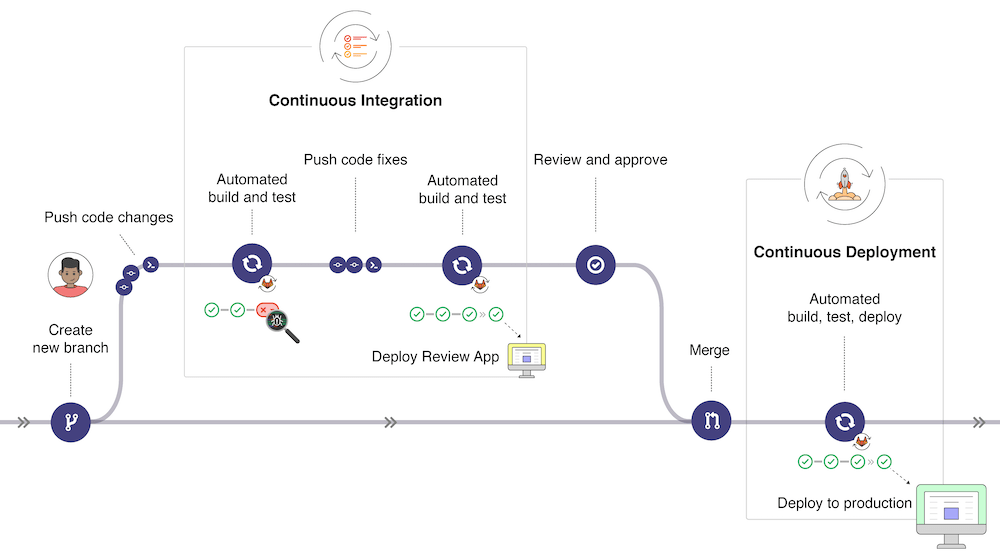
In the picture below (taken from GitLab CI/CD | GitLab, the typical development workflow is depicted. Our workflow will be simplified but it is useful to have an overview of the global picture:
- Once changes have been made to a software under development, these changes can be pushed to a specific branch in a remote Gitlab repository. As we will experience later, this push triggers the CI/CD pipeline for your project (depending on the action configuration).
- The GitLab CI/CD usually runs automated scripts to build and test your application and then deploy the changes in an application for review (different from the production application).
- If all tests and deployment are successful, the code changes get reviewed and approved, a merge of the specific branch into the production branch is made through a pull request and all changes are deployed to the production environment.
- If something goes wrong, changes are rolled back or further changes are made for correcting the detected problems.
Introduction to Actions and Workflows
A quick introduction to the basics of Actions can be found in the Actions quickstart guide. The following points are worth noting for a better understanding of this workflow file:
- The description is following the YAML specifications syntax. Yaml is somehow an extension of the JSON syntax for improved human readiness.
- GitHub Actions workflow is triggered when an event occurs in the repository
(specified with
on). In the example above, the workflow is triggered when a push is done, when a pull request is opened or manually with GitHub UI. - Each workflow contains one or more
jobs, which can run in sequential order or in parallel. Each job will run inside its own virtual machine runner or inside acontainer, and has one or morestepsthat either run a script that you define or run anaction.
Adding a pre-commit Workflow
We want to ensure that any changes made on any branch is checked against the
pre-commit hooks. To do this, we run a dedicated workflow on GitHub. The
pre-commit workflow file is the following:
.github/workflows/.pre-commit.yaml
name: pre-commit-clang

on:
  push:
    branches:
      - main
  pull_request:
    branches:
      - main
  workflow_dispatch:

jobs:
  pre-commit:
    runs-on: ubuntu-latest
    steps:
      - name: Checkout repository
        uses: actions/checkout@v6

      # Setup Python
      - name: Set up Python
        uses: actions/setup-python@v5
        with:
          python-version: '3.13'

      # In a ubuntu image, setup zephyr environment
      - name: Setup Zephyr
        uses: AdvEmbSof/setup-zephyr-action@v2
        timeout-minutes: 5
        with:
          sdk_version: ${{ github.event.inputs.sdk_version || '1.0.1' }}
          path_west_workspace: ${{ github.workspace }}
          path_west_manifest: ${{ github.workspace }}/manifest-repo/

      - name: Install pre-commit
        run: |
          pip install --upgrade pip
          pip install pre-commit
          pre-commit install

      - name: Install LLVM 22
        run: |
          wget https://apt.llvm.org/llvm.sh
          chmod +x llvm.sh
          sudo ./llvm.sh 22

          sudo apt-get install -y \
            clang-tidy-22 \
            clang-tools-22 \
            clang-22

      - name: Run pre-commit hooks
        run: pre-commit run --all-files --color=always --show-diff-on-failure
Note that in the .pre-commit.yaml file, a section specifies on what branches the workflow gets triggered. Namely,
...
  on:
  push:
    branches:
      - main
  pull_request:
    branches:
      - main
...
Make sure you adapt it according to the branches you use in the project.
Wrap-Up
By the end of this codelab, you should have completed the following steps:
- The software quality tools are in place and each one is working properly.
pre-commitis configured correctly and it is functional both on your computer and as a dedicated workflow on GitHub.- You understand how to configure each tool.
- You understand how to activate the different sanitizers for a Zephyr RTOS application.
- You understand the important differences between static analyzers and sanitizers.
- You made the
blinkyapplication code compliant with all adopted rules. - You made the
sanitizeapplication code compliant with all adopted rules.
Deliverables
Deliverables/Requirements (Project Phase A)
The deliverables/requirements for project Phase A include the following:
- The
pre-commitconfiguration is added to your repository and after cloning your repository,pre-commitmust run successfully on a machine with the required tools installed. All tool configuration files are available and identical to those documented in this codelab. The following hooks are added to thepre-commitconfiguration: id: clang-tidy-blinky-
id: clang-tidy-sanitize -
The
pre-commitdedicatedpre-commit.ymlworkflow is added to your GitHub repository and thepre-commitaction runs successfully. -
The
blinkyapplication passes allpre-committests. Runningjust run-clang-tidy blinky debug+log+gpiois successful and any exception added to the code is documented. -
The
sanitizeapplication is added to your GitHub repository. It includes an example of a runtime bug detected by a sanitizer as described in question 1. -
The
sanitizeapplication passes allpre-committests. Runningjust run-clang-tidy sanitize_app debug+log+sanis successful and any exception added to the code is documented. -
The answer to question 1 is documented in the
README.mdfile on your repository. The corresponding builds succeed and run successfully.